

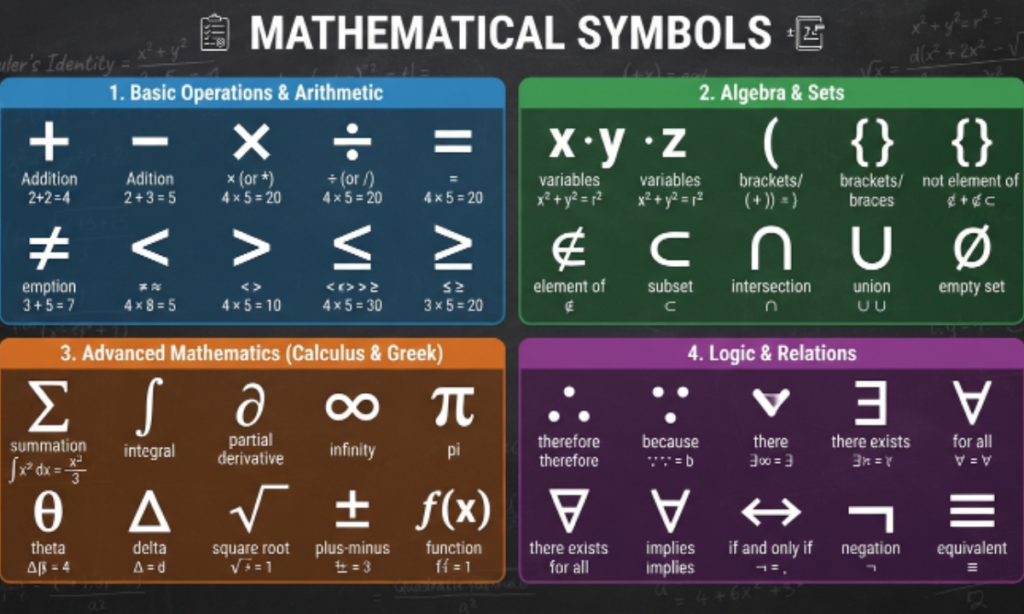
Math is full of symbols. Some of them are hard to type on a normal keyboard. You may need signs like ∑, √, π, or ∞ for your work. Typing these by hand can take a lot of time. That is why many people search for ready-made math symbols. This tool gives you access to over 120 math symbols in one place.
You can copy any symbol with just one click. There is no need to install any software or app. It works right in your browser, on any device. Students, teachers, and writers can all use it easily. It saves time when writing math problems or notes. This free tool makes math typing simple and quick for everyone.
Math Symbols Copy and Paste for Any Document
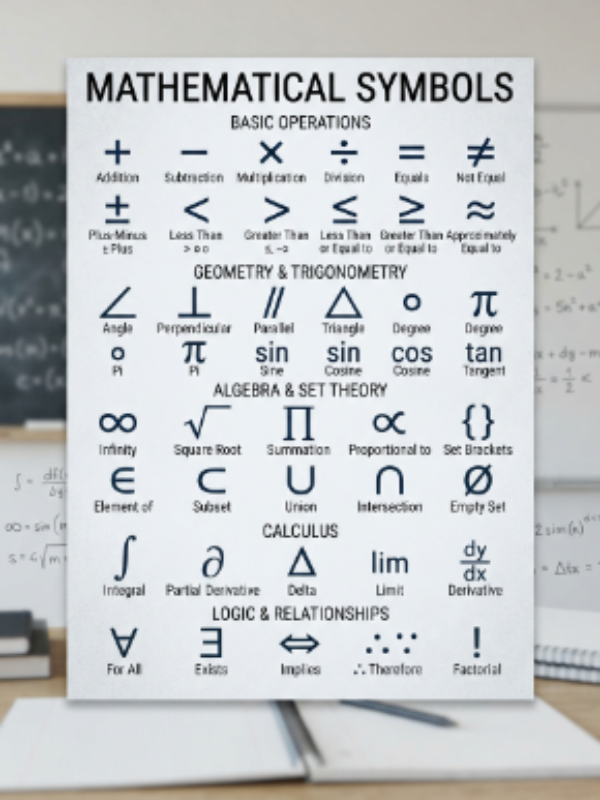
- Math symbols are small signs that carry big meaning inside every equation, formula, or scientific note you write daily.
- Most keyboards do not have direct keys for symbols like ∑, √, π, ∞, or ≠ that math work often needs.Math Symbols
- That gap makes simple tasks slow, especially when a student or teacher is typing a long worksheet or report.
- This free online tool solves that problem by offering more than 120 ready-made math symbols in one clean place.
- You do not need special fonts, plugins, or paid software to access any of these useful mathematical characters here.
- Every symbol on this page is arranged neatly so you can scan and find what you need within seconds only.Math Symbols
- A single click copies the symbol straight to your clipboard, ready to paste anywhere you are currently working today.
- This works for basic arithmetic signs, algebra symbols, geometry marks, calculus notation, and set theory characters as well too.
- Whether you write in Word, Excel, Google Docs, or a simple text editor, these symbols paste in cleanly every time.
- No internet-based rendering issues occur because these are standard Unicode characters supported by nearly every modern application available today.
- Teachers preparing exam papers save real time by pulling symbols directly instead of hunting through confusing menus and dialog boxes.
- Students writing assignments get access to the exact notation their textbook uses without guessing how to recreate it manually.
- Professionals working with technical reports also benefit because accurate symbols make formulas look clean, correct, and easy to read.
- This tool removes the frustration of memorizing keyboard shortcuts that differ across operating systems, apps, and device types entirely.
- It is especially handy on mobile phones and tablets, where typing special characters is normally much harder than on desktops.
- You can copy one symbol at a time or grab several in a row for longer, more complex math expressions.
- There is no sign-up, no login, and no hidden cost attached to using this simple copy and paste resource.
- The layout stays consistent whether you are on a laptop, a phone browser, or a tablet screen of any size.Math Symbols
- Because everything loads instantly, you spend less time searching and more time actually finishing your written work.
- In short, this page turns a slow, annoying task into a quick two-second action anyone can complete with ease.
Why Use a Math Emoji & Symbols Tool?
- A dedicated math symbols tool exists because standard keyboards were never designed with scientific notation in mind at all.
- Searching the web for a single symbol every time you need one wastes valuable minutes that add up quickly.
- This tool gathers every common symbol in one organized list, removing the need to jump between different unreliable websites.
- Accuracy matters in math, and copying a symbol guarantees you get the exact correct character every single time.
- Typing a symbol manually through obscure keyboard codes often leads to mistakes that confuse readers or break formulas entirely.
- With copy and paste, there is zero risk of selecting the wrong character or a visually similar but incorrect one.
- This method also works across every major platform, including Windows, macOS, Android, iOS, and Linux based systems as well.
- You avoid installing extra keyboard apps or memorizing long alt-code sequences that are difficult to recall under pressure.
- For anyone writing frequently about numbers, formulas, or data, this tool becomes a reliable daily shortcut worth bookmarking today.
- It also helps non-technical users who simply need one symbol occasionally but do not want to learn complex shortcuts.
- Because the tool is free, there is no barrier preventing anyone from using it as often as they like.Math Symbols
- The interface stays simple on purpose, so first-time visitors understand exactly how to copy a symbol immediately without help.
- Consistency is another benefit, since every symbol displays the same way it will appear once pasted elsewhere later.
- This removes formatting surprises that sometimes happen when symbols are typed through unreliable third-party input methods instead.
- Whether you need one symbol or twenty, the process stays exactly the same, fast and completely straightforward.
- This makes the tool useful for one-time tasks and for people who need symbols regularly throughout their work week.
- Overall, it saves time, reduces errors, and removes the stress of hunting for correct mathematical notation online.
- That combination of speed, accuracy, and simplicity is exactly why people keep coming back to use it again.
- It fits naturally into any writing workflow without requiring extra steps, downloads, or technical knowledge beforehand.
- Simply put, it turns a small annoying problem into something that barely takes any thought or effort at all.
For Students & Teachers
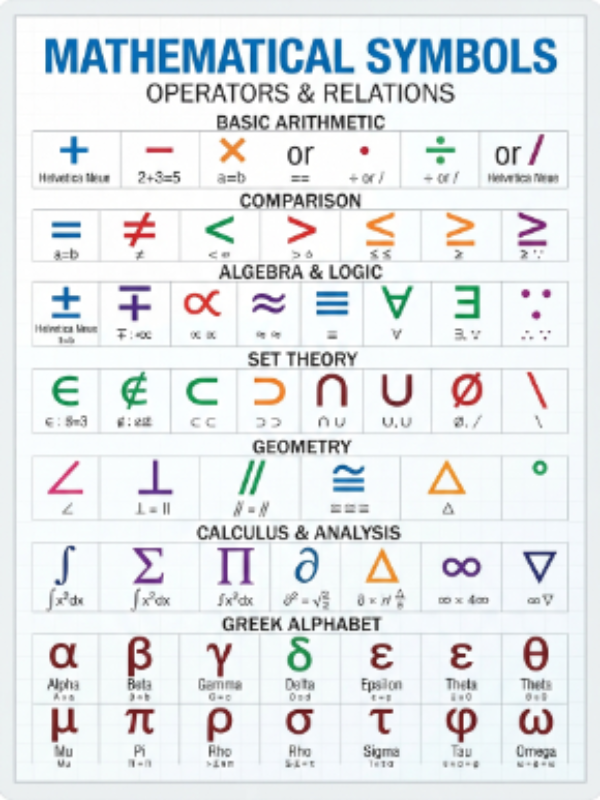
- Students often need symbols like π, √, or ∑ while solving homework, writing notes, or preparing assignments for class submission.
- Teachers use this tool to create exams, worksheets, and slides that include accurate mathematical notation without formatting headaches later.Math Symbols
- Copying symbols directly avoids the confusion of trying to type them through complicated on-screen keyboard menus during class time.
- It helps younger students learn correct symbol usage by seeing the exact character rather than guessing an approximate substitute.
- Group projects benefit too, since every student can paste identical symbols, keeping shared documents looking clean and consistent throughout.
- Online learning platforms often lack built-in symbol keyboards, making this tool a practical backup during virtual classes and exams.
- Teachers grading digital submissions appreciate correctly formatted symbols because they make formulas easier to read and mark accurately.Math Symbols
- Tutors explaining concepts through chat or email can quickly paste symbols instead of describing them in plain, confusing text.
- This tool also supports students studying advanced topics like calculus, statistics, or geometry where symbols appear constantly in notes.
- For distance learning, it removes a small but real barrier that slows down typing math-heavy questions and answers online.
- Study guides created with correct symbols look more professional and are easier for other students to follow along.
- Teachers building question banks save time by pasting symbols once and reusing them across multiple documents repeatedly.
- It is equally useful for parents helping children with homework who are unfamiliar with typing scientific notation themselves.
- Because it works on any device, students can use it on school computers, home laptops, or personal phones.
- This flexibility makes it a dependable resource throughout the entire school year, not just for occasional assignments.
- Whether writing a quick note or a full research paper, students get consistent, accurate symbols every single time.
- Overall, this tool supports better learning by making mathematical communication clearer for both students and their teachers.
- It reduces small mistakes that often come from guessing at unfamiliar keyboard shortcuts under time pressure.
- For any classroom setting, digital or physical, having quick access to symbols improves overall writing quality.
- In the end, it makes teaching and learning math a little smoother for everyone involved daily.Math Symbols
For Engineers & Data Analysts
- Engineers frequently write formulas involving symbols like Δ, Σ, θ, or ∞ while documenting calculations and technical specifications daily.
- Data analysts use statistical symbols such as μ, σ, and ≥ when explaining results in reports or presentations regularly.
- Typing these characters manually through code points is slow and easy to get wrong under tight project deadlines.
- This tool lets professionals paste the exact symbol needed without breaking focus or switching between multiple browser tabs constantly.
- Technical documentation looks more credible and precise when formulas use correct mathematical notation instead of written-out approximations.
- Engineers preparing reports for clients benefit from symbols that render correctly across PDF, Word, and presentation software formats.
- Data analysts writing dashboards or summaries can paste symbols directly into spreadsheet cells without formatting errors appearing later.
- This is especially useful when collaborating with international teams, since standard symbols avoid language-based misunderstandings during communication.Math Symbols
- Engineers working across multiple software tools appreciate that Unicode symbols behave consistently, unlike custom font-based alternatives sometimes used.Math Symbols
- For research papers, correct symbol usage is often required by publishers, making this tool genuinely time-saving during submissions.
- Analysts building automated reports can keep a reference list of symbols to paste quickly into recurring documents.
- This tool also helps when writing technical emails that need one or two symbols without opening heavy software.
- Because everything is web-based, engineers can access it from any workstation without installing additional local software.
- It supports faster documentation cycles, which matters in fast-paced engineering and data-driven work environments today.
- Analysts explaining statistical significance or averages can insert symbols instantly instead of describing them in full words.
- This small efficiency adds up significantly when someone writes technical content on a daily or weekly basis.Math Symbols
- Overall, the tool bridges a small but constant gap between technical accuracy and everyday typing convenience.
- It keeps formulas clean, professional, and easy to understand for colleagues, clients, and stakeholders reviewing the work.
- For any engineer or analyst working with numbers regularly, this becomes a genuinely practical daily resource.
- It ultimately supports clearer, faster, and more accurate technical communication across many different industries and projects.
For Developers
- Developers often need math symbols while writing documentation, comments, or user interfaces that display formulas or scientific content clearly.
- Typing symbols directly into code editors can be tricky since some editors do not support easy special character input.
- This tool allows developers to copy a symbol and paste it straight into source code, comments, or markdown files.Math Symbols
- It is especially useful when building educational apps, calculators, or scientific tools that require accurate on-screen symbol display.
- Developers working with LaTeX, HTML entities, or plain Unicode benefit from having a quick, reliable copy source available.
- Instead of memorizing HTML codes for symbols like ∑ or ≠, developers can simply paste the character directly instead.
- This speeds up front-end development when building interfaces that show mathematical content to end users visually.Math Symbols
- It also helps when writing technical blog posts, README files, or API documentation involving formulas or algorithms explained.
- Because the tool works in any browser, developers can use it regardless of their operating system or coding environment.
- This flexibility fits naturally into fast development workflows where switching context repeatedly slows down productivity significantly.
- Developers testing internationalization or Unicode support in their applications can also use this list as a quick testing reference.
- It removes the need to search separate Unicode charts or reference tables scattered across different technical websites.
- For hackathons or quick prototypes, having instant access to symbols saves valuable development time under pressure.
- This tool also supports developers building chatbots or educational platforms that need to output math symbols dynamically.
- Copy and paste remains one of the fastest, most reliable methods for inserting characters into any codebase directly.
- It avoids encoding issues that sometimes occur when symbols are typed manually through inconsistent keyboard input methods.
- Overall, this resource fits smoothly into a developer’s daily toolkit alongside other reference and utility websites used regularly.
- It makes working with math-related features noticeably easier during both development and later documentation stages.
- For any developer dealing with formulas, calculators, or scientific content, this tool becomes a handy time-saver.
- In short, it simplifies a small technical task that otherwise interrupts focus during active coding sessions.
How to Copy Math Symbols
- Copying a math symbol from this page takes only a few simple steps that anyone can follow easily today.
- First, scroll through the full list of symbols until you find the exact one your document currently needs.
- Next, simply click or tap on the symbol you want, and it copies automatically to your clipboard instantly.
- There is no need to highlight text manually or use complicated keyboard shortcuts to complete this simple action.
- Once copied, switch to your document, email, spreadsheet, or app where you want the symbol to appear.
- Right-click and select paste, or use the standard paste shortcut for your device to insert the symbol.
- On Windows, this shortcut is usually Control plus V, while Mac users typically use Command plus V instead.
- Mobile users can simply tap and hold in the text field, then choose paste from the small menu.Math Symbols
- The symbol will appear exactly as shown on this page, with no formatting changes or rendering issues.
- You can repeat this process as many times as needed for different symbols within the same document.
- If you need multiple symbols together, copy and paste them one at a time in the correct order.
- This method works reliably across nearly every app, including word processors, browsers, and messaging platforms used daily.
- Because these are standard Unicode characters, they display correctly on most fonts without requiring special formatting.
- If a symbol looks different in your app, it may simply be using a different font style visually.
- The underlying character remains correct, even if its visual appearance changes slightly between different software programs.
- This copy-paste method avoids the need to remember confusing numeric codes or obscure keyboard combinations entirely.
- It also works well for people unfamiliar with technical typing methods, making the tool genuinely beginner friendly.
- Overall, the process is quick, requires no technical skill, and works the same way every single time.Math Symbols
- Once you get used to it, copying symbols becomes a fast, almost automatic part of your writing routine.
- This simple workflow is exactly why so many users prefer this method over manual typing alternatives.
How to Type Math Symbols on Any Device
- While copy and paste is the fastest method, some devices also support typing math symbols using built-in shortcuts.
- On Windows computers, holding the Alt key while typing a specific numeric code can produce certain math symbols directly.
- Mac users can access special characters through the Character Viewer, opened using Command, Control, and Space together instantly.
- Linux systems often support Unicode input through key combinations that vary slightly depending on the desktop environment used.
- Android phones usually offer symbol access through the emoji or symbol tab within the default on-screen keyboard.
- iPhone users can access some symbols through the keyboard’s number and symbol pages, though options remain fairly limited.
- These built-in methods work, but they often require memorizing codes or navigating multiple menus to find symbols.
- For users who need only one or two symbols occasionally, these shortcuts might feel convenient enough for casual use.
- However, for frequent use, copy and paste remains significantly faster and far less prone to input errors.Math Symbols
- Typing symbols manually also risks selecting a visually similar but technically incorrect character by mistake sometimes.
- Copy and paste guarantees the exact Unicode character every time, regardless of which device or keyboard is used.
- This becomes especially important in academic or professional writing, where symbol accuracy genuinely matters for clarity.
- Some third-party keyboard apps also offer symbol shortcuts, though installing extra software is not always necessary or convenient.
- Browser extensions exist too, but they add complexity that most casual users simply do not need regularly.Math Symbols
- For most people, switching between typing shortcuts and this tool depends entirely on personal preference and habit.
- Beginners generally find copy and paste easier since it requires no memorization of codes or menus at all.
- Advanced users comfortable with shortcuts may mix both methods depending on the device they are currently using.
- Either way, having multiple options ensures you can always insert the correct math symbol when needed.
- This flexibility makes it easier to work efficiently across different devices throughout a normal working day.
- Ultimately, understanding both methods gives you more control over how quickly and accurately you can type symbols.
In Microsoft Word
- Microsoft Word includes a built-in Symbol menu found under the Insert tab near the top toolbar area.
- Clicking Symbol opens a small window showing many characters, including several common mathematical and scientific symbols available.
- For symbols not shown immediately, selecting More Symbols opens a larger library with additional categories to search through.
- Word also supports typing certain Unicode codes followed by pressing Alt and X to convert them into symbols.
- This method works well but requires knowing the exact code, which many users do not remember easily.Math Symbols
- Copying and pasting a symbol from this tool remains much faster than navigating through Word’s built-in menus repeatedly.
- Once pasted, the symbol behaves like normal text, meaning you can resize, bold, or color it as needed.Math Symbols
- This makes formatting formulas or scientific notes inside Word documents noticeably simpler and more visually consistent overall.
- Word’s Equation Editor is another option, though it is better suited for full formulas rather than single symbols.
- For quick single-symbol insertions, copy and paste remains the simplest and most beginner-friendly approach available today.
- This method also avoids compatibility issues that sometimes occur when sharing documents across different Word versions.
- Because pasted symbols use standard Unicode, they display correctly even when opened on a different computer later.
- This consistency is especially useful for teachers, students, and professionals sharing documents across multiple devices regularly.
- Overall, combining Word’s built-in tools with quick copy-paste symbols gives users flexibility depending on the situation.
- For occasional use, copy-paste is faster, while Word’s menu suits users building complex, symbol-heavy documents regularly.
- Either approach ultimately achieves the same visual result inside your finished document without major differences.
- Choosing the right method simply depends on how often you need symbols during your writing sessions.Math Symbols
- For most everyday tasks, copy and paste remains the quickest, most convenient solution available inside Word.
- Word also lets you save frequently used symbols as AutoCorrect entries for even faster future insertion.
- This combination of tools makes Word a flexible option for both quick edits and longer symbol-heavy work.
In Excel & Google Sheets
- Spreadsheets often need math symbols for labeling formulas, headers, or notes within cells throughout a workbook.
- In Excel, you can insert symbols through the Insert tab, similar to the process used in Word documents.
- However, copy and pasting directly into a cell is usually faster than navigating through multiple menu options.
- Once pasted, the symbol behaves like normal cell content and can be formatted, resized, or aligned freely.
- Google Sheets does not include a built-in symbol menu, making copy and paste the most practical option available.
- Simply copy the symbol from this tool, click into the target cell, and paste it directly there.Math Symbols
- This works smoothly whether you are labeling a single cell or building a larger structured spreadsheet layout.
- Symbols pasted this way remain consistent even when the spreadsheet is shared or opened on another device.
- This is especially useful for data analysts labeling statistical values like averages, standard deviation, or percentage change symbols.
- Engineers using spreadsheets for calculations also benefit from clearly labeled headers using accurate mathematical notation throughout.
- Because both Excel and Google Sheets support Unicode, pasted symbols display correctly without additional formatting adjustments needed.
- This reduces confusion when spreadsheets are shared among teams using different software versions or operating systems.
- For recurring reports, you can paste symbols once and reuse the same spreadsheet template repeatedly going forward.
- This saves time during weekly or monthly reporting cycles where identical formulas or symbols are frequently reused.
- Copy and paste also avoids formatting glitches that sometimes occur with manually typed special character codes.
- Overall, this method keeps spreadsheets clean, professional, and easy to understand for anyone reviewing the data later.
- Whether working alone or collaboratively, accurate symbols improve clarity across shared spreadsheets significantly over time.
- This small habit makes spreadsheet work noticeably smoother for students, analysts, and business professionals alike.
- In short, copy and paste remains the simplest way to insert symbols into any spreadsheet quickly.Math Symbols
- This makes both Excel and Google Sheets equally easy to use once you know the symbol source.Math Symbols
In Google Docs
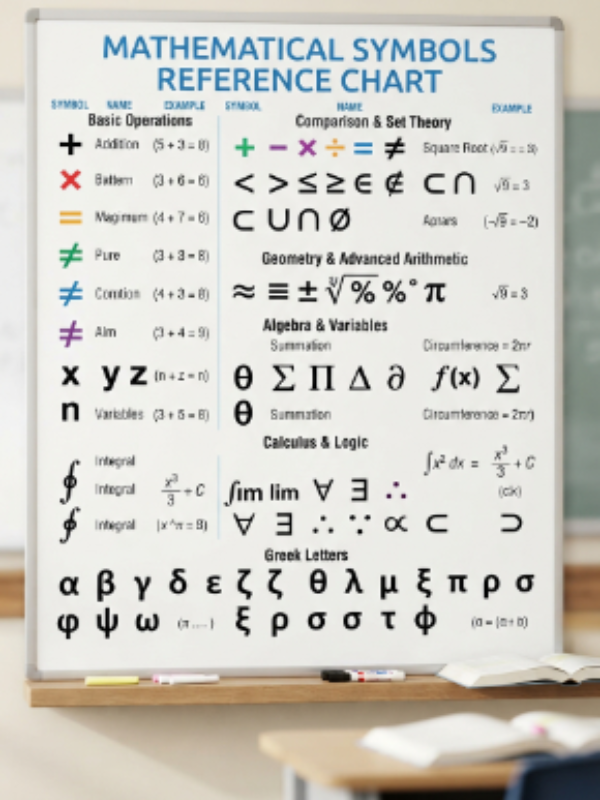
- Google Docs includes a built-in special characters tool accessible through the Insert menu near the top of the screen.
- Selecting Special Characters opens a searchable panel where you can browse or type keywords to locate specific symbols.
- While functional, this method can feel slower compared to simply copying a symbol from a dedicated external tool.Math Symbols
- Copy and pasting directly into Google Docs is often quicker, especially when you already know which symbol you need.
- Once pasted, the symbol integrates smoothly with the rest of your text, matching font size and style automatically.Math Symbols
- This makes it easy to insert symbols within paragraphs, headings, or bullet points without breaking document formatting.
- Google Docs also supports real-time collaboration, meaning pasted symbols remain visible correctly for all users viewing the file.
- This is particularly useful for group assignments or shared reports where multiple people edit the same document together.
- Because Google Docs works entirely in the browser, copy and paste functions reliably across different operating systems used.
- Students and teachers often prefer this method since it avoids extra clicks through built-in character search menus.
- For longer documents involving multiple symbols, copy and paste significantly speeds up the overall writing process.
- This approach also reduces the chance of accidentally inserting an incorrect or visually similar symbol by mistake.
- Because Docs automatically saves changes, pasted symbols remain safely stored without needing any additional manual saving steps.
- This makes the workflow smooth for anyone switching between multiple documents or tabs while writing simultaneously.
- Overall, Google Docs handles pasted symbols cleanly, keeping formatting consistent throughout the entire document structure.
- This reliability makes it a popular choice for academic writing, reports, and collaborative technical documentation projects.
- Whether working solo or with a team, accurate symbol usage improves the overall clarity of shared documents.
- In the end, copy and paste remains the fastest, most convenient method within Google Docs overall.
- It also works well on Chromebooks, which many schools use as the primary device for student writing.
- This makes Google Docs one of the easiest platforms for quickly inserting accurate math symbols anywhere.
Frequently Asked Questions
1. Is this math symbols tool free to use?
Yes, this tool is completely free, with no sign-up, subscription, or hidden charges required at any time.
2. Do I need to install any software to copy symbols?
No installation is needed at all; everything works directly inside your web browser on any device.
3. Will the symbols display correctly in Word or Google Docs?
Yes, since these are standard Unicode characters, they display correctly across Word, Docs, Sheets, and most apps.
4. Can I use these symbols on my mobile phone?
Yes, the tool works smoothly on Android and iOS browsers, allowing easy copying directly from your phone.
5. Do I need to know the symbol’s name to find it?
No, you can simply scroll through the organized list and click the symbol you visually recognize.
6. Is there a limit to how many symbols I can copy?
No, you can copy as many symbols as you need, one after another, without any restrictions.
7. Will the symbols change formatting when pasted?
No, pasted symbols usually match your document’s existing font and size automatically without extra adjustments.
8. Can developers use these symbols inside code or markdown files?
Yes, developers can paste these symbols directly into code comments, documentation, or markdown files easily.
Conclusion
Math symbols do not need to be hard to find or type anymore. This free tool gives you over 120 symbols ready to copy in seconds. It works on any device, for students, teachers, and professionals alike.
Whether you use Word, Excel, Google Docs, or code editors, pasting stays simple and accurate every time. No downloads, no sign-ups, and no confusing shortcuts to remember at all. Just pick your symbol, copy it, and get back to your work quickly.
