
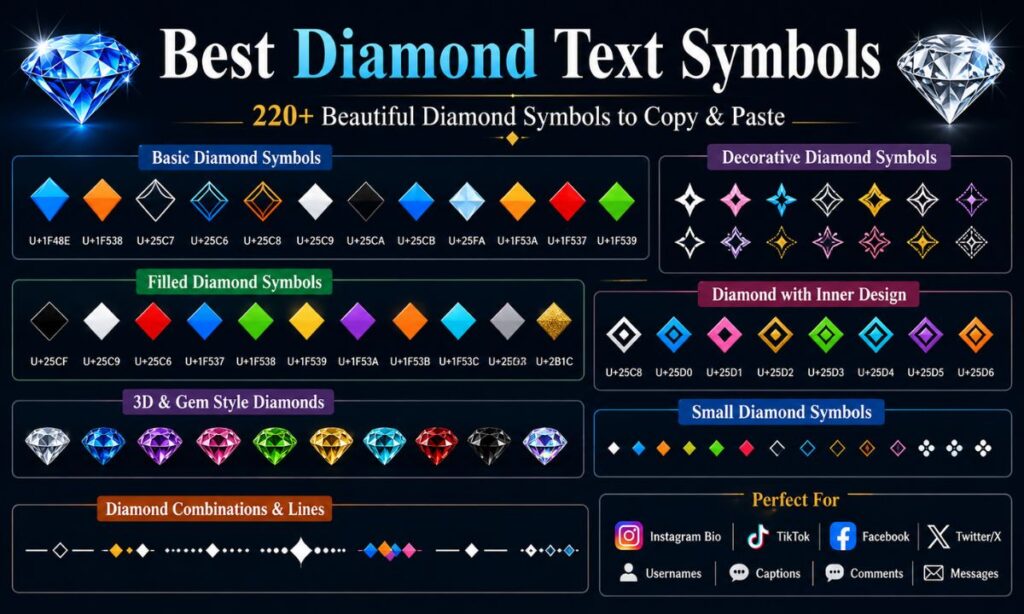
Diamond Text Symbols Copy Paste for Bio your bio stands out instantly. They’re small, sharp, and stylish. You don’t need an app to use them. Just copy the symbol and paste it anywhere. It works on Instagram, TikTok, and every other platform. Even a single diamond can change how your name looks.
There are so many types to choose from. Some are bold and solid, like ◆. Others are soft outlines, like ◇. You can pick colorful emoji diamonds too, like 💎 and 🔷. Each one gives off a different vibe. This guide has every version ready to copy.
Diamond Text Symbol And Emojis 💍⬛💎
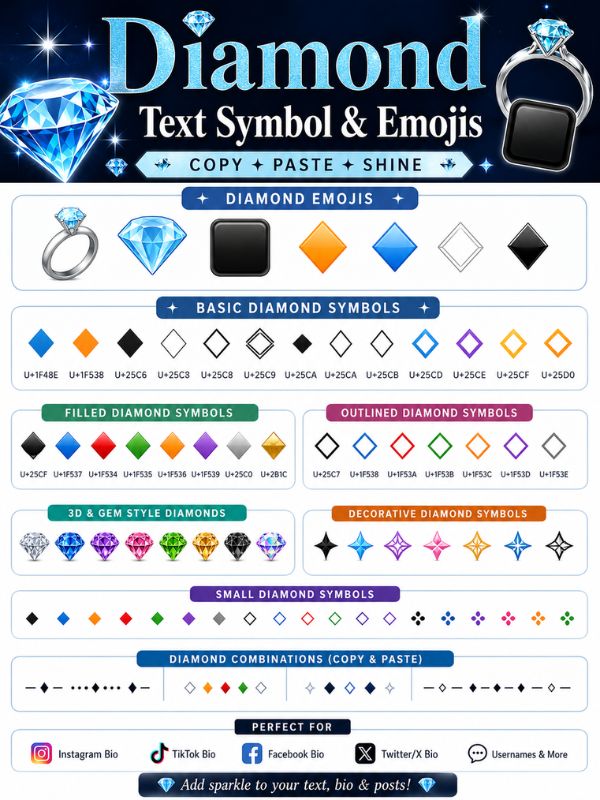
Diamond text symbols are special Unicode characters like ◆, ◇, ♦, ◈, and 💎 that you can copy and paste directly into any bio, caption, username, or message without needing a keyboard shortcut or a font app. If you’ve ever scrolled through an Instagram bio or a TikTok username and wondered how someone got those sparkly little shapes to show up, this is exactly how they did it. These characters aren’t images. They’re text, which means they work everywhere text works: Instagram, TikTok, Facebook, Discord, WhatsApp, X, even your phone’s default keyboard.Diamond Text Symbols Copy Paste for Bio
Diamond shapes have carried meaning for centuries, long before emojis existed. In playing cards, the diamond suit represents wealth and status. In jewelry, a diamond signals commitment, luxury, and rarity. That symbolism carried straight into digital culture, which is why diamond symbols show up so often in usernames tied to luxury brands, gaming clans, fashion pages, and aesthetic “clean girl” or “baddie” bios. A diamond next to your name reads as premium, polished, and a little bit exclusive, and that’s exactly why creators reach for it.Diamond Text Symbols Copy Paste for Bio
Diamond text symbol and emojis 💍 ⬛ 💎 meaning
Every diamond symbol carries a slightly different meaning depending on its shape, fill, and color, so picking the right one changes the message your bio actually sends. A solid black diamond (◆) tends to read as bold and confident, while an outlined white diamond (◇) feels softer, more minimal, and aesthetic. Understanding this distinction matters because the same word, “diamond,” is being used to describe characters that look and feel completely different once they’re placed next to your name.Diamond Text Symbols
The colored diamond emojis carry their own layered meanings too. The blue diamond (🔷 and 🔹) is often used to represent trust, calm, or a business or verified feel, which is why you’ll spot it in professional or brand-style usernames. The orange diamond (🔶 and 🔸) leans warmer and more playful, and creators often use it in gaming or streetwear-adjacent profiles. Meanwhile, the diamond with a dot (💠) has become shorthand in some online communities for something rare or special, almost like a badge.Diamond Text Symbols
Beyond aesthetics, there’s a practical layer of meaning too. Many people use small diamond symbols as bullet points or separators in their bio, for example between a name and a tagline, like “Ali ◆ Photographer ◆ Karachi.” In this case, the diamond isn’t symbolic at all, it’s functional, acting as a clean visual divider that looks sharper than a plain dash or dot. A diamond symbol can be decorative, symbolic, or purely structural, and often it’s all three at once.Diamond Text Symbols
Diamond text symbol and emojis 💍 ⬛ 💎 copy
Copying a diamond symbol takes one tap, and you don’t need to install anything to do it. Every symbol on this page is already rendered as live text, so all you have to do is highlight it, hit copy, and paste it wherever you’re typing, whether that’s your Instagram bio field, a text message, or a Discord username. This works the same way on iPhone, Android, and desktop, since Unicode characters aren’t tied to any specific app or operating system.Diamond Text Symbols
If you’re on mobile, press and hold on the symbol until the selection handles appear, drag to select just that character, then tap “Copy” from the popup menu. On a desktop, you simply click and drag your mouse across the symbol, then use Ctrl+C on Windows or Cmd+C on Mac. Once it’s copied, it sits on your clipboard exactly like any word you’d copy from a document, ready to paste with Ctrl+V or Cmd+V, or a long press and “Paste” on mobile.Diamond Text Symbols
One thing worth knowing: not every diamond symbol displays the same way on every device. Emoji versions like 💎 and 🔷 are rendered by each phone’s operating system, so a diamond on an iPhone might look very slightly different from the same diamond on a Samsung phone. Plain Unicode symbols like ◆ and ◇, on the other hand, tend to render more consistently across platforms because they’re treated as text characters rather than picture-based emojis. Unicode diamond characters were standardized decades ago specifically so text could travel across different systems without breaking.Diamond Text Symbols
Diamond emoji text
“Diamond emoji text” usually refers to combining an actual diamond emoji with regular letters to build a styled name or caption, something like “◆ Sara ◆” or “💎Fashion Diaries💎.” This trend took off because plain text usernames started feeling flat, and adding a symbol on either side instantly makes a name look designed rather than default. It’s a small trick, but it changes how a profile feels at a glance.Diamond Text Symbols
There’s a real difference between using diamond emojis (the colorful picture-based ones like 💎 or 🔷) versus diamond text symbols (the flat character-based ones like ◆ or ◇) inside a name. Emoji diamonds tend to pop more and grab attention because of their color, which works well for casual or fun profiles. Text-based diamond symbols look more subtle and minimal, which fits better with professional bios, portfolio accounts, or anyone going for a cleaner, more grown-up look.Diamond Text Symbols
Combining diamond emoji text with spacing also matters more than people expect. A cramped symbol jammed right against a letter, like “◆Sara◆,” reads differently than one with a small space, like “◆ Sara ◆.” The spaced version almost always looks more intentional and easier to read, especially on smaller phone screens where cramped text can look like a rendering error rather than a style choice. Small formatting choices like spacing are often what separates a bio that looks professionally designed from one that looks accidental.Diamond Text Symbols
Diamond symbol emoji
The diamond symbol emoji category covers the full-color, picture-based diamonds built into your phone’s emoji keyboard, including 💎 (gem stone), 🔷 (large blue diamond), 🔶 (large orange diamond), 🔹 (small blue diamond), and 🔸 (small orange diamond). Unlike the flat Unicode symbols, these are true emojis, meaning they’re rendered as small illustrations rather than typed characters, and they’re accessed through the same emoji picker you’d use to send a 😂 or a ❤️.Diamond Text Symbols
The gem stone emoji 💎 is by far the most recognized of the group, and it’s used constantly across social media to represent value, quality, or something being “top tier.” You’ll see it in captions praising a good deal (“this find was a 💎”), in usernames for jewelry or luxury resale businesses, and in comments where someone wants to compliment content without writing a full sentence. Its meaning has stretched well beyond literal diamonds to represent anything considered rare or excellent.Diamond Text Symbols
The blue and orange diamond emojis, by contrast, are used far less for their literal meaning and far more as visual bullet points or dividers, especially in business and creator bios that want a clean, structured look. Because they come in a small and large version, they’re also handy for creating a simple visual hierarchy, using the large diamond to separate major sections and the small diamond for minor ones. Emoji diamonds are picture-based and can render differently across devices, while text diamond symbols stay visually consistent everywhere.Diamond Text Symbols
Diamond emoji copy and paste
The phrase “diamond emoji copy and paste” is one of the most searched versions of this topic, mainly because people don’t want to dig through their phone’s emoji keyboard scrolling past hundreds of icons to find the handful of diamond ones. Copying directly from a page like this saves that hassle entirely; you get every version in one place instead of hunting through categories.Diamond Text Symbols
To copy any diamond emoji here, simply tap and hold it on mobile, or click and drag on desktop, then copy it the same way you would copy any other text. Once copied, it can be pasted into literally any app that accepts emoji, including ones that don’t normally show an emoji keyboard, like certain desktop chat tools or older software. This is one of the biggest advantages of copy and paste over typing an emoji manually: it works even in apps with limited emoji support.Diamond Text Symbols
It’s also worth mentioning that some platforms restrict how many emojis you can use in a username or bio field, so if you’re building a longer combination like “💎✦Aesthetic Vibes✦💎,” it’s smart to test how it displays before finalizing it. A string that looks perfect on your phone’s preview screen can sometimes get cut off or render oddly once it’s actually saved, especially on platforms with strict character limits. Testing your symbol combination in the actual app before publishing avoids an awkward surprise later.Diamond Text Symbols
Invisible Diamond symbol copy and paste
An invisible diamond symbol isn’t really invisible in the magical sense, it’s a diamond-shaped character that uses a transparent or blank rendering in certain fonts, or it refers to genuinely blank Unicode characters (like the invisible separator or zero-width space) that people use alongside diamond symbols to create gaps in a username without an actual visible space. This trick became popular for building usernames that look like they float or have unusual spacing that a regular keyboard space bar can’t achieve.
People search for this specifically because some apps, including Instagram and certain gaming platforms, don’t allow a plain blank space at the start or end of a username. An invisible character sidesteps that restriction because, to the system, it still counts as a valid character even though nothing visible shows up. Combined with a diamond symbol, someone might build a name that appears to have a diamond floating with unusual spacing around it, which stands out in a crowded list of usernames.
It’s worth being upfront here: true “invisible diamonds” don’t exist as a single universal symbol, since every font and platform handles blank or transparent characters slightly differently. What actually works is pairing a real diamond symbol, like ◆ or 💎, with an invisible Unicode space character copied from a reliable source, then testing exactly how it displays on the specific platform you’re using. What renders as invisible on one app can sometimes appear as a small visible box or question mark on another, so testing first matters.
Filled diamond symbol symbol font 168
A filled diamond symbol refers to any diamond character that’s completely solid in color rather than just an outline, and the most common ones are ◆ (black diamond) and 🔷🔶 (colored emoji diamonds). The “168” reference some people search for typically points back to old symbol font character maps, like Wingdings or Webdings, where specific numbered codes corresponded to specific shapes, including filled diamonds, back before Unicode symbols became the easier standard.Diamond Text Symbols
Filled diamonds tend to feel heavier and more visually dominant than their outlined counterparts, which is exactly why they’re often chosen for logos, headers, or anywhere someone wants a symbol that commands attention rather than blending in quietly. A filled diamond next to a brand name reads as confident and finished, almost like a punctuation mark that closes off the sentence with authority.
If you’re working inside a design tool like Word, Canva, or PowerPoint rather than a phone keyboard, you can usually still access filled diamond symbols through the “Insert Symbol” menu using a font like Wingdings, where specific character codes (similar to what people mean by “168”) map to diamond shapes. That said, for everyday use on social media or messaging apps, copying a Unicode filled diamond directly, like ◆, is far faster and doesn’t require switching fonts at all. Filled diamonds read as bolder and more decisive, while outlined diamonds read as lighter and more minimal.
Black Diamond text symbol
The black diamond text symbol, written as ◆, is the single most copied diamond character on the internet, and for good reason: it’s clean, it’s bold, and it renders identically across almost every device and platform without turning into a colorful emoji picture. This makes it the go-to choice for anyone who wants a diamond that looks the same whether it’s viewed on an iPhone, an Android phone, or a laptop browser.Diamond Text Symbols
Its Unicode code point is U+25C6, and because it’s part of the standard Unicode geometric shapes block, it’s supported by essentially every modern font. That reliability is exactly why designers, brand accounts, and professional bios lean on it instead of the emoji version; a black diamond text symbol won’t suddenly look different because someone updated their phone’s operating system, the way an emoji sometimes does.
Beyond bios, the black diamond symbol shows up constantly as a section divider in longer captions, as a bullet point replacement in lists, and even in some brand logos where a simple geometric mark communicates precision and quality without needing any color at all. Fashion, jewelry, and minimalist lifestyle accounts especially favor it because it fits so naturally into a black-and-white aesthetic. The black diamond symbol (◆) is Unicode character U+25C6, and it’s the most widely used diamond symbol on social media because it renders consistently across every major platform.Diamond Text Symbols
Quick Copy List: 20+ Diamond Symbols
| Symbol | Name | Best Used For |
| ◆ | Black Diamond | Bios, dividers, minimalist branding |
| ◇ | White Diamond | Soft aesthetic bios |
| ♦ | Diamond Suit | Card-themed or luxury bios |
| ♦️ | Diamond Suit Emoji | Casual captions |
| ♢ | White Diamond Suit | Light dividers |
| ⬥ | Diamond Shape | Structured text |
| ⬦ | White Diamond Shape | Minimal spacing |
| ◈ | Diamond With Dot | Special, rare emphasis |
| ❖ | Decorative Diamond | Header decoration |
| ❈ | Diamond Flower | Aesthetic bios |
| ❉ | Diamond Ornament | Decorative captions |
| ✦ | Diamond Star | Sparkle effect |
| ✧ | White Diamond Star | Light sparkle effect |
| 🔹 | Small Blue Diamond | Bullet points |
| 🔷 | Large Blue Diamond | Section dividers |
| 🔸 | Small Orange Diamond | Bullet points |
| 🔶 | Large Orange Diamond | Section dividers |
| 💠 | Diamond With A Dot | Rare or special badges |
| 💎 | Gem Stone | Value, luxury, quality |
| ⧫ | Black Lozenge | Technical or minimal text |
Follow Us
This “Follow Us” section is where you’ll find every social platform this page is active on, along with quick answers to the most common questions people search about following and being followed online. It’s separate from the diamond symbol content above, but it’s just as useful if you’re looking to stay updated on new symbol lists or grow your own following.Diamond Text Symbols
Staying connected across platforms matters because different networks serve different purposes. TikTok and Instagram are best for visual, fast-moving symbol trend updates, while X and Facebook tend to work better for longer explanations and community discussion. Following across more than one platform means you’re less likely to miss an update if one app changes its algorithm or goes down temporarily.
Below, you’ll find direct guidance for each platform, plus answers to real questions people ask about the mechanics and etiquette of following and being followed on social media today.Diamond Text Symbols
Follow us on TikTok
TikTok is the fastest-growing place to catch new symbol and text trend content, since short videos make it easy to show exactly how a copied symbol looks in a live bio. If you want to see diamond symbols used inside real trending bio and caption styles, TikTok is usually where those trends surface first, often weeks before they show up anywhere else.Diamond Text Symbols
Following an account on TikTok is simple: open the profile and tap the “Follow” button beneath the bio. There’s no cost and no commitment beyond that single tap, and you can unfollow just as easily at any time. Many creators also post duet or stitch videos reacting to symbol and text trends, which can be a fun way to see multiple styles compared side by side.
If you’re specifically hunting for more copy-paste symbol content, searching hashtags like #textsymbols or #biosymbols on TikTok tend to surface fresh, creator-tested combinations that haven’t made it into most written guides yet.
Follow us template
A “follow us template” typically refers to a pre-designed graphic or caption format that creators reuse to remind their audience to follow, subscribe, or turn on notifications. These templates often include diamond symbols themselves, since a simple “◆ Follow for more ◆” line looks noticeably cleaner than plain text alone.
Using a consistent template across posts builds recognition over time. When an audience sees the same visual style, symbol, and phrasing show up in every caption, it starts to register as a signature, almost like a mini logo made entirely of text. That consistency is a small but genuinely effective branding tool for creators who don’t have design software.
If you’re building your own template, keeping it short works best. A single diamond symbol, a clear call to action, and your platform name is usually enough, since overly long templates tend to get skipped over rather than read.
Follow us on Facebook
Facebook remains one of the largest platforms for community-style following, especially through Pages and Groups rather than individual profiles. A Facebook Page lets you follow updates without needing to be personal friends with the account, which makes it a good fit for brand or content-focused following.
To follow a Page, visit it and tap “Follow,” which is separate from “Like,” though most people end up doing both. Following alone will show updates in your feed, while liking is more of a public show of support. Facebook Groups work slightly differently, requiring you to request or accept membership before you see posts.
For symbol and text content specifically, Facebook Groups dedicated to social media tips and aesthetic bios tend to be active spaces where people share and discuss new combinations they’ve found, often faster than a single Page can post updates.
Follow us on Instagram
Instagram is arguably the single biggest driver of diamond symbol searches, since bios are limited to 150 characters, which pushes people to look for compact, expressive ways to say more with less. A well-placed diamond symbol can separate a name from a tagline without eating into that tight character count the way extra words would.
Following on Instagram takes one tap on the “Follow” button on any profile. If the account is private, that tap instead sends a follow request, which the account owner has to manually approve before you can see their posts. Public accounts, by contrast, show content to anyone immediately.
Instagram’s bio editor also supports most Unicode diamond symbols directly, without needing any special app, which is exactly why so many bio-styling searches lead people to this kind of copy-paste page in the first place.
Follow us download
“Follow us download” generally points to downloading an app, whether that’s the official app of the platform itself or a third-party tool that helps manage following, symbol copying, or bio design. Official apps like Instagram, TikTok, and Facebook are available for free on both the Apple App Store and Google Play Store.
Downloading the official app instead of relying on a mobile browser almost always gives a smoother experience, since apps are built specifically for that platform’s features, including emoji and symbol support in bio fields. Browser versions sometimes render symbols slightly differently or restrict certain characters that the app allows.
If you’re looking for a dedicated symbol copy-paste app rather than a social platform app, it’s worth checking reviews carefully first, since many low-quality apps in this category are cluttered with ads or request unnecessary permissions for something as simple as copying text.
Follow us on social media
Being active “on social media” broadly means maintaining a presence across more than one platform rather than relying on just one. For anyone following diamond symbol or text trend content, spreading across two or three platforms usually means catching updates faster, since not every platform posts the same content at the same time.
Each platform also tends to attract a slightly different audience with different habits. X tends to favor quick text-based updates and discussion threads, Instagram favors polished visuals and stories, and TikTok favors fast, trend-driven short videos. Following across all three gives a more complete picture than sticking to just one.
Notifications settings matter here too. Turning on post notifications for an account, rather than just following it, ensures you actually see new symbol lists or trend updates as soon as they go live, instead of them getting buried in a busy feed.
Follow us app
If there’s a dedicated app tied to this content, it typically centralizes symbol libraries, trend updates, and copy-paste tools into one place rather than requiring separate visits to multiple social platforms. This can save time for anyone who frequently needs fresh symbols for bios, usernames, or captions.
A good symbol or follow app should load quickly, work offline where possible, and avoid excessive permission requests, since a simple text-copying tool has no real reason to need access to your contacts, location, or camera. Reading app store reviews before downloading is a smart habit, especially in a category with a lot of low-effort clones.
Whether or not a standalone app is used, the core functionality, copying a symbol and pasting it somewhere else, will always work through any web browser too, so an app is a convenience rather than a strict requirement.
Follow us on X
X, formerly known as Twitter, remains a strong platform for fast-moving text and symbol discussions, since its format naturally favors short, text-heavy posts over the video-first style of TikTok or Instagram. Threads breaking down new symbol combinations or explaining Unicode tricks tend to perform well here.
Following on X works the same simple way as other platforms: visit a profile and tap “Follow.” X also supports lists, which let you group followed accounts by topic, so someone specifically interested in text symbols and design tips could build a dedicated list separate from their general following feed.
Because X’s character limits push people toward efficient, compact writing, it’s also one of the best places to see creative diamond symbol placements used as punctuation, dividers, or emphasis inside a single tight post.
All Categories
The “All Categories” section is essentially a directory, a map of every topic covered across this kind of resource beyond just diamond symbols. It exists to help readers who came for one specific symbol type discover related categories like heart symbols, star symbols, or font generators without needing to search separately for each one.
Organizing content into clear categories also improves the overall experience for anyone browsing rather than searching directly. Instead of scrolling endlessly through one massive list, categories let a reader jump straight to hearts, stars, arrows, or checkmarks depending on exactly what they need for their bio or post.
Below is a breakdown of what “all categories” actually includes, how those categories are typically organized, and where to find quick answers about icons, downloads, and reference lists tied to this kind of symbol resource.
All categories list
A full categories list for a symbol resource site typically includes groups like heart symbols, star symbols, arrow symbols, check and cross marks, currency symbols, math symbols, and of course diamond symbols, among others. Each category serves a different styling purpose depending on what someone is trying to communicate.
Browsing by category is especially useful for building a themed bio, since mixing symbols from unrelated categories, say a diamond next to a random currency sign, can look cluttered rather than intentional. Sticking within one or two related categories tends to produce a cleaner, more cohesive look.
Most category lists are updated periodically as new Unicode blocks get standardized or as new symbol trends emerge on social platforms, so checking back occasionally can surface options that weren’t available or trending even a few months earlier.
All categories download
Downloading a categories list usually means saving a reference sheet, often as a PDF or image, that lays out every symbol grouped by type in one document you can keep on your phone or computer for quick reference later, rather than searching online every time.
A downloaded reference is particularly handy for anyone managing multiple social accounts or doing bio design work regularly, since it removes the need to revisit a website each time and instead keeps a personal copy on hand for instant access.
When downloading any reference file, it’s worth double-checking that it comes from a source you trust, since some low-quality sites bundle unnecessary software or excessive ads alongside what should be a simple text document.
All categories meaning
Understanding what each category “means” helps match the right symbol type to the right context. Heart symbols generally communicate affection or approval, star symbols suggest excellence or rating, arrow symbols indicate direction or progression, and diamond symbols, as covered earlier, lean toward luxury, value, or structure.
Knowing these general associations helps avoid mismatched combinations. Pairing a diamond symbol, which reads as premium and polished, with symbols from an unrelated, more casual category can send a confusing visual signal that undercuts the overall aesthetic someone is going for.
Category meaning isn’t rigid, though. Online culture shifts fast, and symbols regularly pick up new meanings through trends and memes that have nothing to do with their original purpose, so it’s worth paying attention to how a symbol is actually being used in current bios and captions, not just its textbook definition.
All categories pdf
A categories PDF works similarly to a downloadable reference sheet, but specifically formatted as a print-friendly or easily shareable document. PDFs are popular for this purpose because they preserve formatting consistently across devices, unlike some text files that can shift or break depending on the app opening them.
For designers, social media managers, or anyone handling multiple client accounts, a categories PDF can double as a quick-reference cheat sheet during content planning sessions, cutting down the time spent searching for the right symbol mid-project.
As with any downloadable file, sourcing a categories PDF from a reliable, well-maintained page ensures the symbols inside are current and render correctly, rather than pulling from an outdated list with broken or deprecated characters.
All AI names list
An “AI names list” in this context usually refers to a separate reference category listing names, tools, or platforms related to artificial intelligence, included as part of a broader all-categories directory rather than being directly tied to diamond symbols themselves.
This kind of list has become increasingly common on resource sites because readers researching one digital topic, like text symbols, are often also interested in adjacent digital tools, including AI writing or design assistants, making it a natural category to include alongside more traditional symbol groupings.
While this category sits outside the core diamond symbol topic, its presence on an all-categories page reflects how broad these kinds of resource hubs have become, covering everything from simple text characters to entire directories of digital tools in one place.
Categories icons
Category icons are the small visual markers, often simplified graphic symbols, used to represent each category at a glance, making it faster to scan and find the right section without reading every label in full. A tiny heart icon next to “Heart Symbols” or a small star next to “Star Symbols” speeds up navigation considerably.
Good icon design for categories keeps things simple and instantly recognizable rather than overly detailed or stylized, since the goal is quick visual recognition, not artistic complexity. A cluttered or overly abstract icon can actually slow down navigation rather than helping it.
Many category icon sets also aim for visual consistency, using the same line weight, size, and color palette across every icon so the overall page feels organized and professionally designed rather than mismatched.
Categories icon Font Awesome
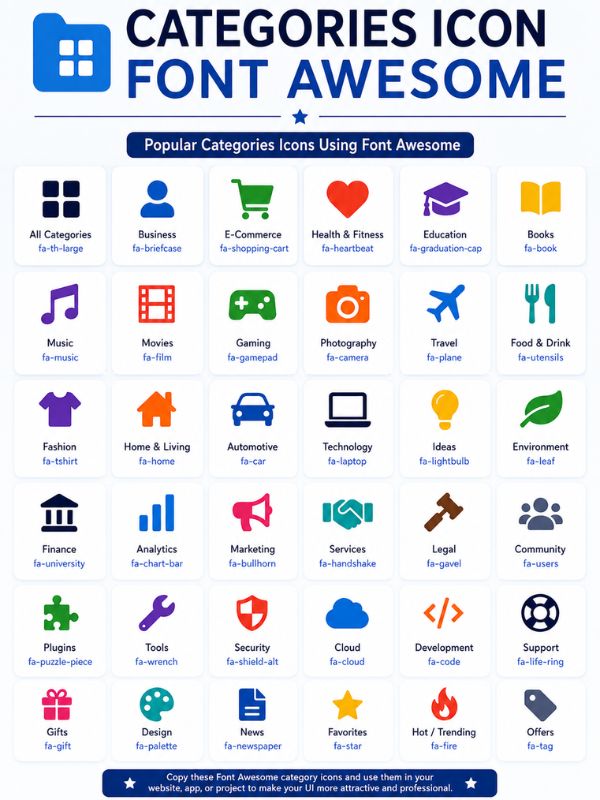
Font Awesome is one of the most widely used icon libraries in web design, offering thousands of scalable vector icons that developers can implement directly into a website’s category navigation instead of using static images. Its popularity comes from being lightweight, easy to style with code, and consistent across different screen sizes.
For a symbol resource site, Font Awesome icons are often used specifically for category navigation menus, filter buttons, or sidebar labels, since they load quickly and can be recolored or resized without any loss in quality, unlike a standard image file.
Developers building or maintaining this kind of categorized resource page frequently choose Font Awesome specifically because it integrates smoothly with most website platforms and requires minimal extra code to implement well.
G2 categories
G2 is a well-known software review platform where products and tools are organized into structured categories to help users compare options within the same space. Its category system is often referenced as a model for how to organize digital tools and resources clearly, since G2 categories are known for being detailed and well-maintained.
Referencing G2’s category structure can be useful inspiration for any resource site organizing its own content, since G2’s approach to grouping tools by specific use case, rather than broad general labels, tends to help users find exactly what they need faster.
While G2 itself focuses on software reviews rather than text symbols, its general approach to clean, use-case-based categorization is a good example of organizational best practice that applies well beyond just software comparison.
Frequently AskedQuestions
What is the meaning of “following us”?
It means subscribing to our social media page or profile so our posts and updates show up in your feed.
How do you say “follow us” on social media?
Common phrases: “Follow us for more,” “Hit follow to stay updated,” or “Join our community — follow us.”
What to say instead of “follow me”?
Try “Join me,” “Stay connected,” “Be part of the journey,” or “Subscribe for updates.”
How do I add followers on Instagram?
Post consistently, use relevant hashtags, engage with other accounts, and share content that encourages people to hit follow.
How do I get 5000 followers on Instagram?
Post high-quality content regularly, collaborate with other creators, run promotions, and use trending hashtags and Reels.
How can I get 1000 followers on Instagram?
Focus on a niche, post consistently, engage with your audience’s comments, and cross-promote on other platforms.
How do I say “follow my page”?
You can say “Follow my page for daily updates” or “Give my page a follow to stay in the loop.”
How do I ask someone to follow me?
Be direct but friendly: “Would love for you to follow me for more content like this!”
What is a good sentence to follow (as a call-to-action)?
“Follow along for more tips, updates, and behind-the-scenes content.”
Conclusion
Diamond symbols are a small change with a big impact. They make any bio feel more polished. You don’t need design skills to use them. Just copy the one you like and paste it in. It takes only a few seconds. That’s the whole process, nothing complicated.
Try a few different styles and see what fits you best. A bold diamond suits confident, sharp profiles. A soft outline works for calm, minimal looks. Emoji diamonds add color and personality. There’s no wrong choice here. Pick one, paste it, and let your bio shine.
